See what people are reading right now
Knowing 4 people are on your sites is nice. Knowing what they're reading is better, especially on a small site, where it's often one person who just found a post from years ago.
On the dashboard
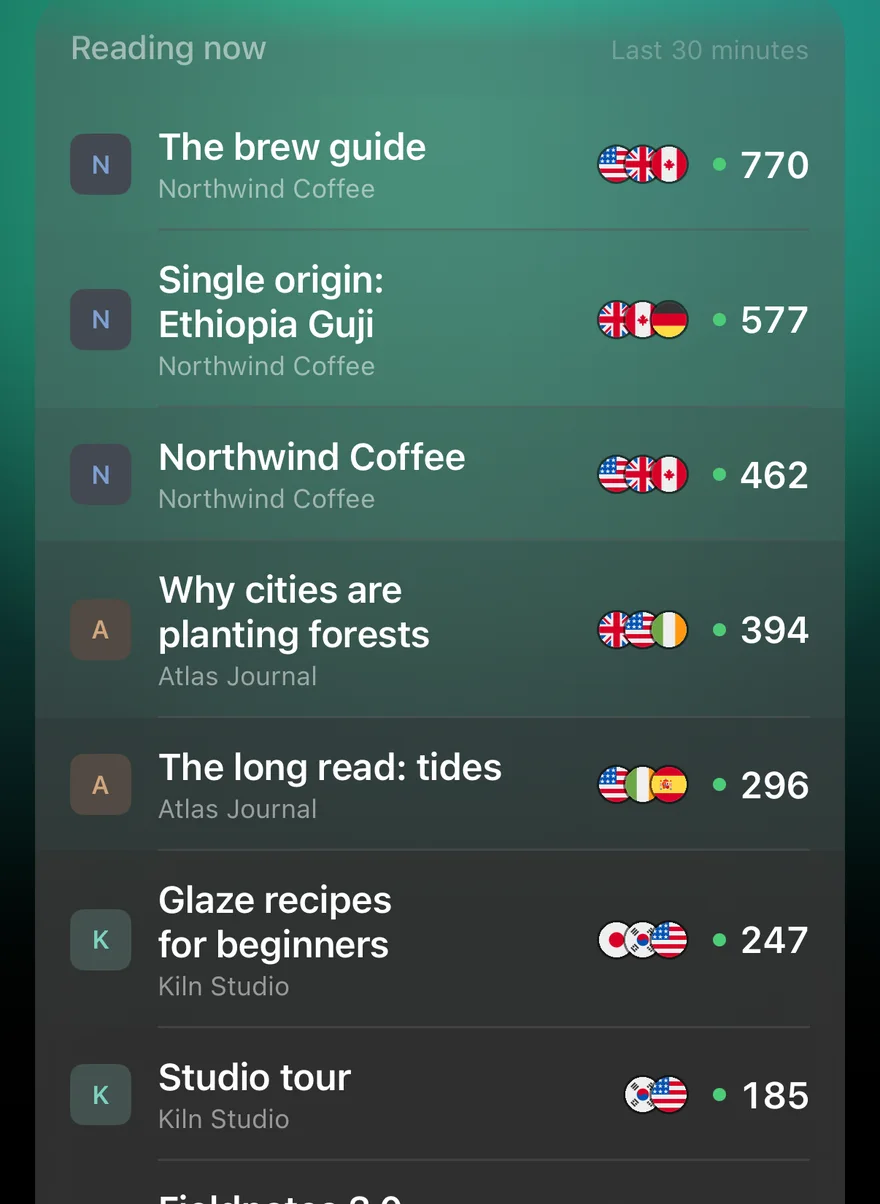
Tap the live now pill to switch to live visitors. Under the list of sites, Reading now shows the pages people are on across all your sites: each page's title, which site it's on, and how many people are reading it. It refreshes every minute with the live counts.
On each site
On a site's page, with Today selected, the Pages tab starts with that site's own Reading now list, above the day's top pages.
Since iPhone 1.1.2 (35) you don't have to open the tab to see it. Under the chart, the live now card shows how many people are on the site, their flags, and the two pages most of them are reading. If there are more, "All 6 pages being read" takes you to the full list on the Pages tab.
Since 1.2: where readers are, and what's coming
Since iPhone 1.2 (36) and Android 1.2 (33):
- Flags on each page. Every row in Reading now shows the flags of the countries its readers are in, so you can see who just landed on that post.
- Tap a page to open it on your site; long-press to copy or share its link.
- The last 30 minutes as bars on a site's live-now card, one per minute, so you can tell a spike arriving from one draining away.
- Every country, not "+5". Tap the flags on the live-now card, or above the list on the dashboard's live view, for every country someone's on from, with a count each.
Titles, not addresses
Google's real-time reports know a page's title but not its address, so that's what the list shows. To open a page, GA Bridge matches the title against the site's pages from yesterday and today; a brand-new page with no views in those reports yet doesn't link until it has some. Visits from places GA Bridge has marked as likely bots are left out here too.
For how this compares with Google's own Realtime report, see how to see real-time Google Analytics on your phone.