GA Bridge on iPhone Duo
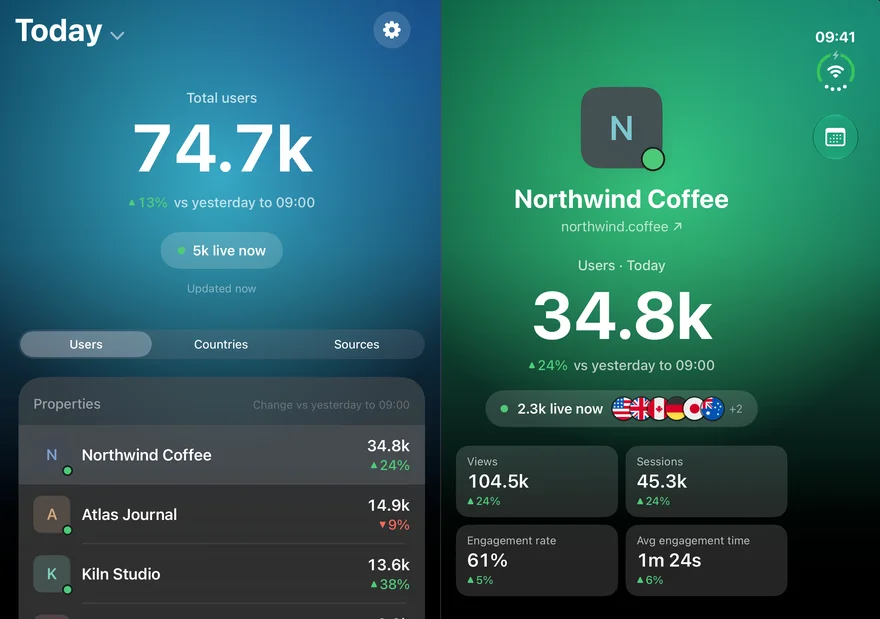
On an ordinary iPhone, tapping a site in GA Bridge slides its page over the dashboard, and you tap back to get to the list again. On iPhone Duo's inner display there's room for both, so that's what you get.
Two halves, one on each side of the fold
Open the phone and the dashboard sits in the left half: the time frame, the total, the Users, Countries and Sources tabs and the list. The right half shows whatever you tap in it:
- On Users, a site's full page: users, who's live, views, sessions, engagement, the typical-day chart and the breakdowns.
- On Countries, that country across all your sites, as in countries across every site.
- On Sources, that source's chart, the sites it sent people to and the exact links.
The row you're looking at is highlighted in the list, so you can step down Northwind Coffee, Atlas Journal and Kiln Studio and compare them without going back and forth. The right half is never empty: until you tap something, it shows the top item of the tab you're on. If you only track one site, that site's page takes the left half and its top traffic source fills the right.
The two halves meet at the middle of the screen, where the phone folds. Cards and buttons stop a margin short of it on both sides, so nothing you'd tap sits in the curve when you hold the phone half-open like a book.
Open, close, carry on
Fold the phone shut after tapping a site, and the outer display opens on that site's page, with the dashboard one tap back. Open it again and you're back to both halves. Closed, GA Bridge looks just as it does on any other iPhone.